Demo
Machiavelli
Machiavelli reads in bank statements, broker statements and crypto balances, categorises transactions automatically and turns your actual balance into a waterfall allocation across reserves, goals and investments.

What it does
A forward-looking financial management tool.
Anyone working as a freelancer or through their own company deals with income streams that don't arrive evenly each month, VAT that needs to be set aside, a buffer for quiet months, salary payments and ideally some room for investments too.
Most accounting software looks backwards at what has already happened. Most budgeting apps are made for individuals with one payslip a month. There's a gap there: a tool that looks ahead, works with the actual transactions from your account, and shows how much room you really have to make allocation decisions.
Machiavelli fills that gap by showing three things side by side. What has come in, what has gone out and what is actually available after obligations.
Methodology
The waterfall principle.
The core formula is simple: bank balance minus minimum operating buffer gives the amount available for allocation. Goals are sorted by priority and filled in order. What's left over is free.
-
01
Determine bank balance
All imported transactions produce a current balance. Actual figures from your real account, not a budget on paper.
-
02
Deduct minimum buffer
The fixed minimum buffer (for example € 2,000 for monthly expenses) is taken off. That money isn't distributed.
-
03
Obligations first
VAT reserve, salary payments and other obligations get their share first. The source is a percentage of your revenue or a fixed monthly amount.
-
04
Goals by priority
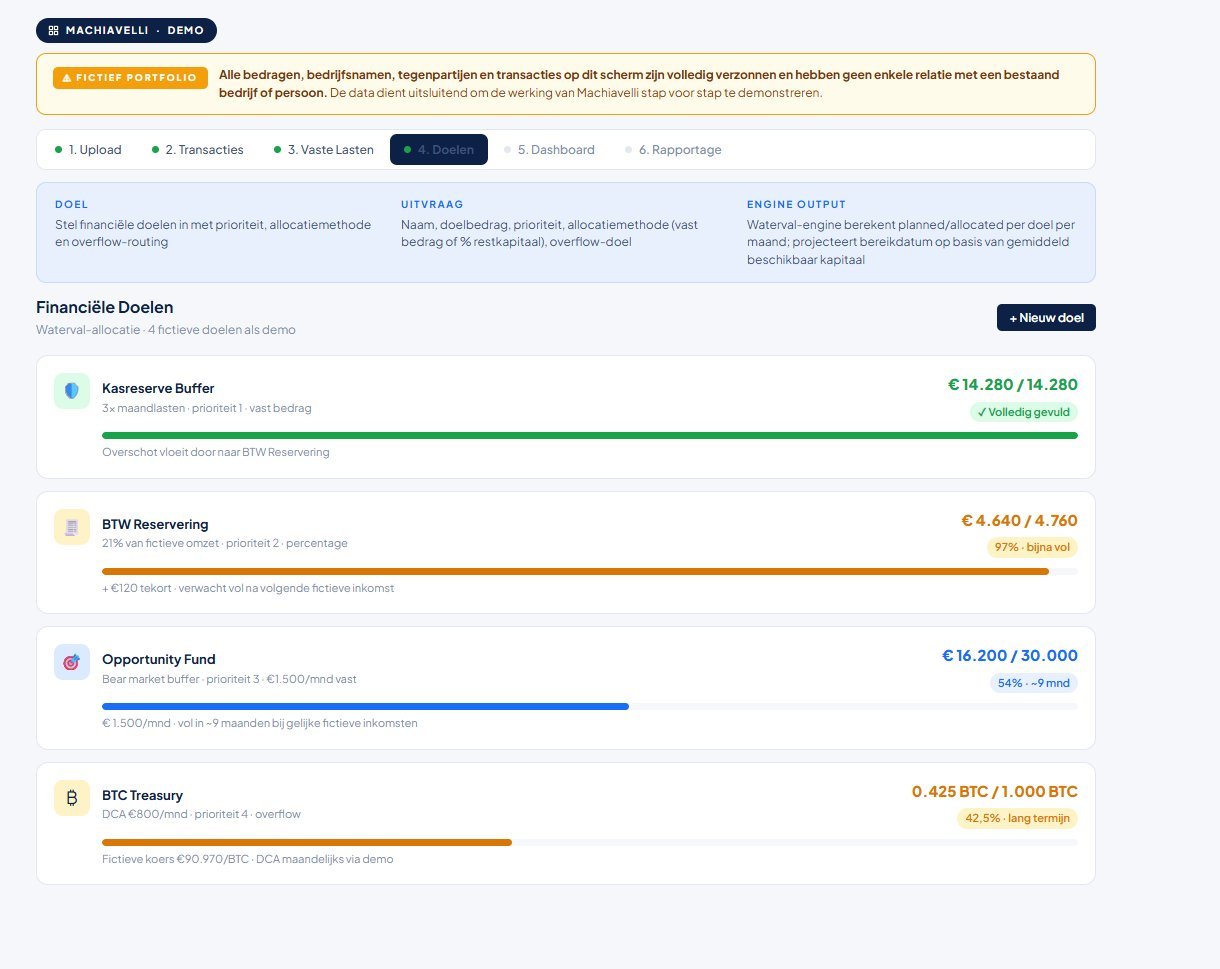
Then the goals in order: topping up the operating buffer, Opportunity Fund, long-term reserves. Each goal takes what it needs.
-
05
Investments as overflow
What's left after the goals can go to investments or crypto, linked to your broker or wallet balances for visibility.
-
06
Freely available
What then remains is truly free. No obligations, no more goals. You know what you can safely spend or set aside.
User flow
From upload to dashboard.
Six steps, and in practice usually within ten minutes from import to insight.
-
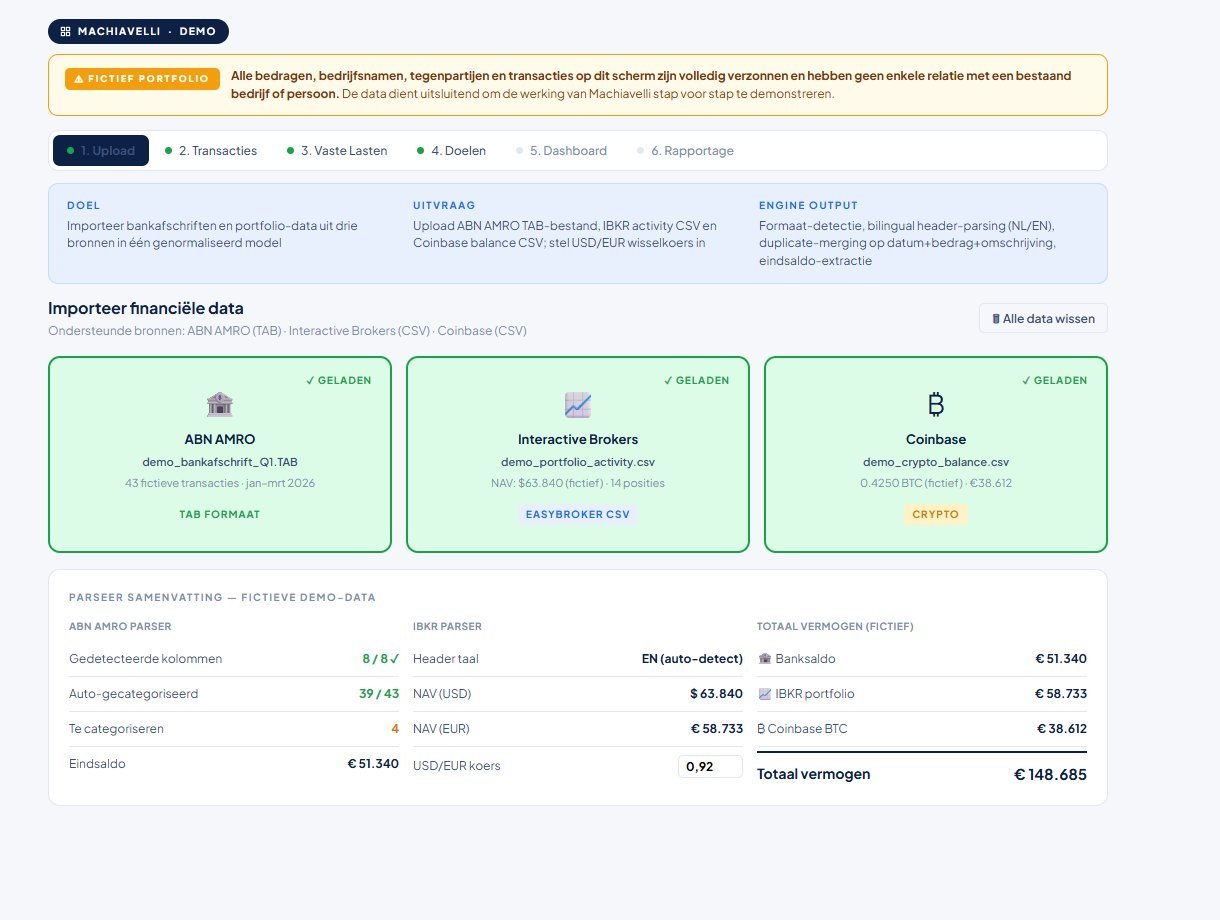
Upload
Drag in CSV or XLSX files from a bank, broker or crypto exchange. ABN AMRO, Interactive Brokers, EasyBroker, Coinbase. The parsers recognise the format automatically.
-
AI verification (optional)
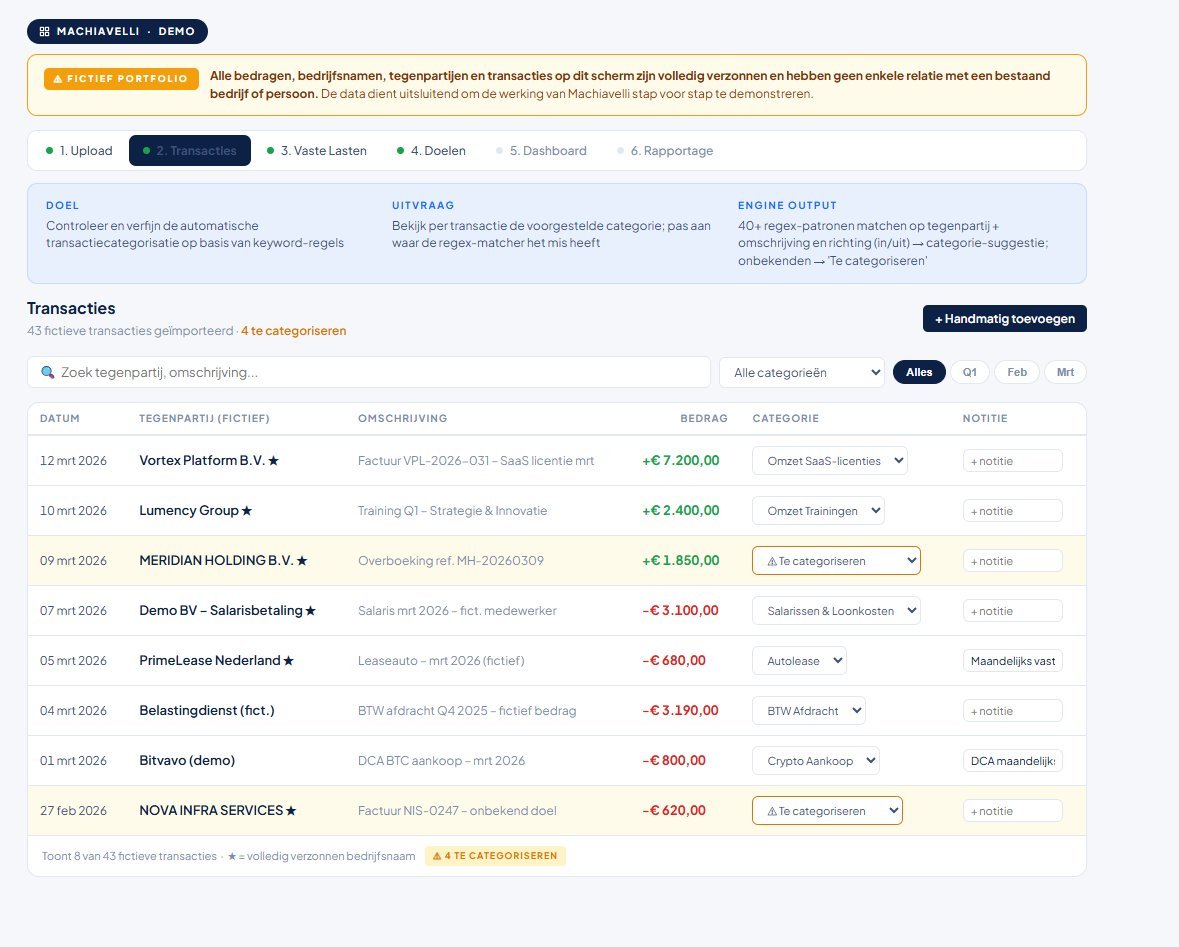
The Claude API reviews transactions and suggests category corrections. Nothing is changed automatically. You decide which suggestions to accept.
-
Dashboard
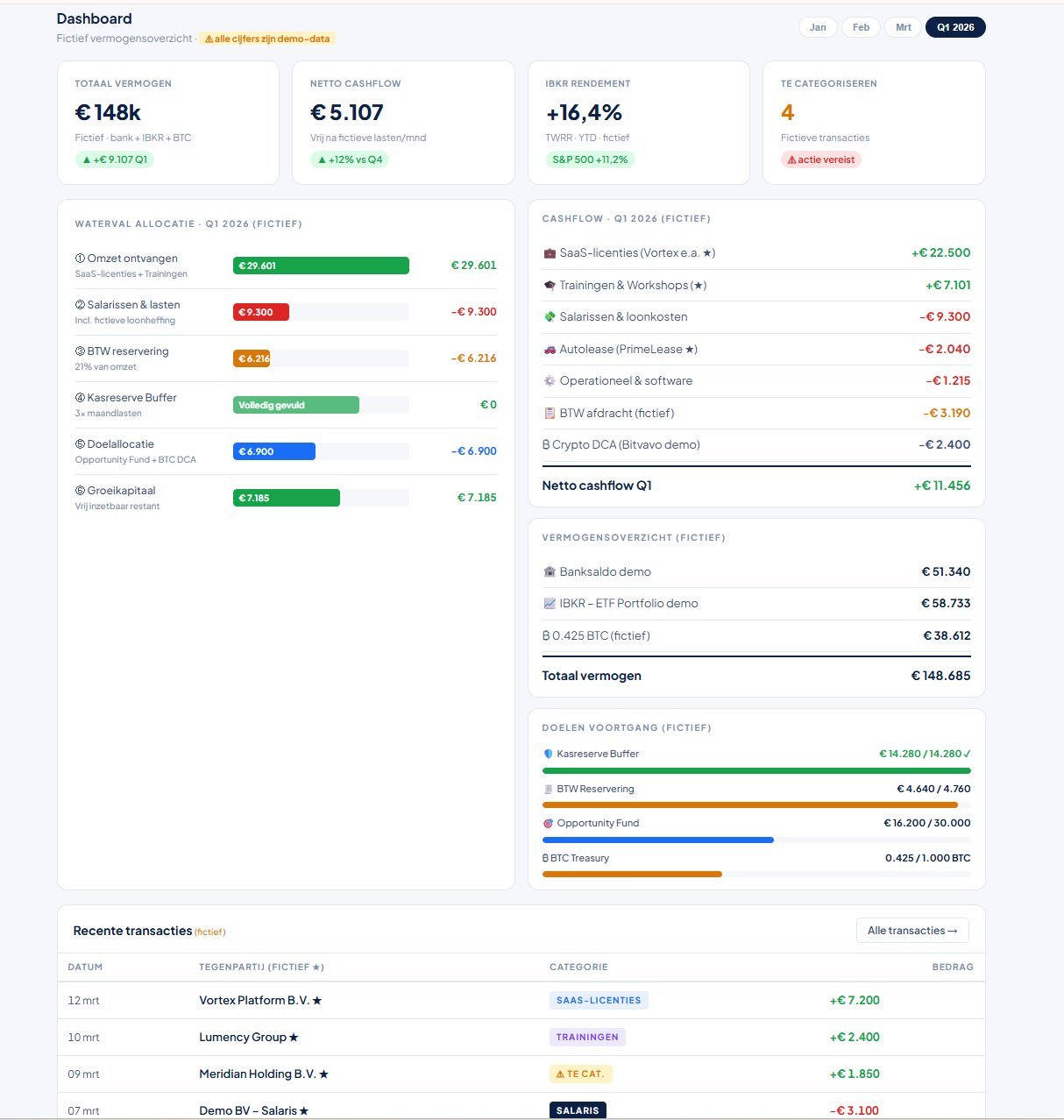
An overview: bank balance, incoming, outgoing, runway based on fixed costs, wealth breakdown, cash flow per category and the waterfall allocation.
-
Manage goals
Add goals with name, type (obligation / reserve / investment), target and priority. Link categories to goals and set overflow rules.
-
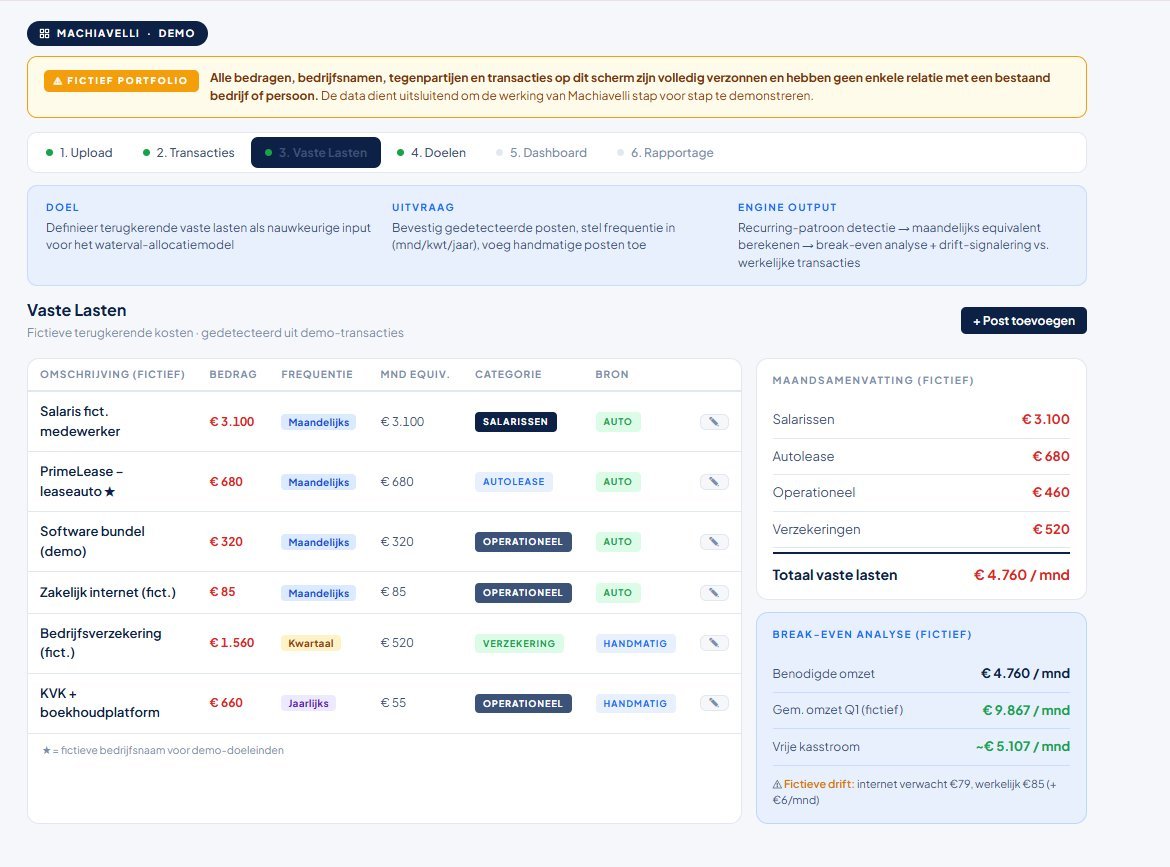
Fixed costs
Add fixed costs with frequency (month, quarter, year). The tool converts everything to a monthly equivalent and uses it in the runway calculation.
-
Reporting
Export to CSV for your accountant, or a full report for your own records. Directly importable into accounting software.
Example
A typical month.
A freelance consultant with their own company uploads 47 transactions from April. Four goals are set: VAT reserve (21% of revenue), operating buffer (€ 8,000 target), Opportunity Fund (€ 15,000 target), and BTC reserve (no target, ongoing).
Bank balance and allocation
Bank balance
€ 12,800
Minimum buffer
€ 2,000
Available
€ 10,800
Waterfall distribution
- VAT reserve (obligation): € 3,885 allocated
- Operating buffer: fully funded
- Opportunity Fund: € 4,915 allocated, target not yet reached
- Freely available after allocation: € 2,000
Conclusion: VAT is reserved, the buffer is in order, the Opportunity Fund is growing. There's still € 2,000 free that can go towards BTC, or with which you could top up a personal spending goal a little earlier in May.
Example figures, fictional. The real tool works with your own transactions.

Origin
Why Machiavelli?
The name refers to Niccolò Machiavelli and his Il Principe: the idea that managing money is a matter of cool calculation and prioritising rather than hoping it works out. A ruler who doesn't spend his resources in order of importance loses his principality. A freelancer who doesn't set aside their VAT gets a bill they didn't see coming. Il Principe: het idee dat financiële sturing een kwestie is van koel rekenen en prioriteren in plaats van hopen dat het goedkomt. Een vorst die zijn middelen niet in volgorde van belang besteed, raakt zijn vorstendom kwijt. Een zelfstandige die zijn BTW niet reserveert, krijgt een rekening die hij niet verwacht.
The tool came out of my own need. I was juggling multiple Excel files to track cash flow, VAT reserve and investments alongside my accounting software. Spreadsheets fell out of sync, formulas broke with every new category, and I'd lost the overview. The first version was an experiment with React, built for one user, one company, one bank export.
Later versions have grown: parsers for multiple sources, waterfall allocation, AI verification, and eventually a generic version that could be useful for others too. v2 runs in production for my own company. v3 is a refactor into a more broadly deployable tool, functional but not yet public.
Status
Availability and limitations.
No public demo, no download, no login. The tool runs on private infrastructure (Docker container, Tailscale for remote access). All data stays on the user's device, no cloud, no SaaS component.
Categorisation is rule-based: a pattern (text, regex or counterparty match) plus a target category. The user manages the rules themselves and can adjust them after each import. The Claude API is only called on explicit action, not automatically.
Try it yourself
See the dashboard in action.
The full tool with sample data: dashboard, transactions, goals and the waterfall allocation. Opens in a new tab, with its own styling.
Open the Machiavelli demo (opens in a new window)Contact
Interested in a similar tool?
Or in guidance on a data or dashboard project in your organisation?
Get in touch